November 30, 2013

TpT Cyber Monday & Tuesday

If you haven't heard, Teachers Pay Teachers is having a HUGE site-wide sale!  I am giving 20% off my entire store.  On top of that, use promo code CYBER to get an additional 28% off at checkout.  Click HERE to visit my store and save!

http://www.teacherspayteachers.com/Store/Sherri-Miller-8867
post signature

November 28, 2013

October 13, 2013

I'm having a SALE!


Teachers Pay Teachers was excited to announce yesterday on their Facebook page that they reached 100K followers!  To celebrate they are offering an extra 10% off if you use FB100K at checkout.  Their offer ends at midnight tonight.  I also decided to hold a sale.  I am giving 20% off today and tomorrow!  So... pick up some new activities and save $$ at the same time. :-)

post signature

October 6, 2013

Favorite Free Fonts & How to Install Them

Yes, I'll admit it... I am a fontaholic.  I LOVE fonts and how they can make a big difference in the way a document  or presentation looks.  So today I'm going to share with you my favorite fonts, where to get them and how to install them.  This is something I get asked quite a bit, so I hope you find this post useful.  My favorites are shown below.  These are the fonts I turn to over and over when creating activities.

 
Click on the links below to take you to the download page:
 
 
Installing Fonts on a PC:
After clicking the link, save the file in a location on your computer, such as My Documents.  The font will download as a zipped file.  To unzip it, double-click the folder and click and drag the fonts out of the folder to your desktop or another location.  Next, open your Control Panel by clicking on Start and finding Control Panel on the right side of the menu.  Open the Fonts folder.  Drag and drop the fonts file into your Fonts folder.  It will copy into the folder and be available in your software programs to use.  Voila!
 
Installing Fonts on a Mac:
Right-click on the font file you want to download and choose Save Link As.  In the Save As screen, choose a location to save the file and click Save.  Open Finder and where you saved the file.  Double-click on the file name.  It will open the font and show all of the letters.  Click on the Install Font button at the bottom of the screen.  It will add the font to the fonts file and be ready to use in your software programs. 
*Note - If you don't have a right-click button, alt option and click on the file or use two fingers to click on your touchpad.
 
**Note - If you have a program, such as Word, open when you install a font you may need to close the program and reopen it in order for the fonts to show in your list.
 
Happy Creating!

post signature

September 2, 2013

Tomorrow's the Big Day

Well, it's time to say good-bye to summer and hello to a new school year.  I have to admit, it's been a great summer and I'm going to miss it, but it is always exciting to start anew.  As a technology integration specialist, I love finding and creating resources for my teachers.  This year, I have several new goals, including this blog.  I hope to add tons of ideas and resources here for my teachers and for you!  Make sure to follow my blog so you don't miss out on a thing. I hope everyone is having a great start to their school year.  Now, I guess it's time for me to get ready for my first day tomorrow.  "Talk" with you soon. :)

post signature

August 17, 2013

It's a SALE!

Have you heard the news??? 
TpT will begin their BIG Back to School site-wide sale in just a few hours and I can hardly wait!  There are sooooo many awesome resources on the site you can get to start your school year off right.  And... yes, my store will be participating in the big event, too.  You will be able to get anything from my TpT store for 20% off... then use the promo code BTS13 at checkout for an even bigger savings ---- 28% OFF!  Now that's a sale!!!  The sale is only on for 2 days... August 18th and 19th.  Click on the graphic below to rush right on over and start shopping!

 
During the sale, get my latest products for back to school:
and so much more!
Happy Shopping!!!
post signature

August 10, 2013

Look What's New... Newsletter Templates!

You may have noticed I've been a little MIA lately.  I have been having a great summer and just spent the last week at the beach with my family.  And... this coming week is "Girlfriends Week" so I am headed back to the beach tomorrow with some of my favorite teacher peeps... YAY!  I am really looking forward to my last fun week of my summer break before heading back to school on the 19th. 

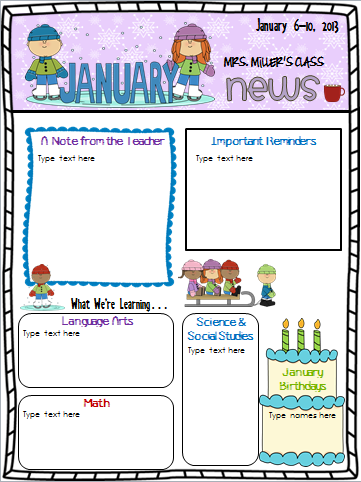
In the meantime, I worked a little at the beach last week and finished my latest project - a set of newsletter templates.  44 to be exact!  That is enough to for a different weekly newsletter for each week of the school year!  I am really excited about the way they turned out. :-)


Each newsletter is completely customizable.  Change the dates, title, section titles, text, etc.  You can also change the fonts and their sizes.  In addition, I included links to the free fonts I used and directions on how to download and install fonts on your machine.  In case you are trying to come up a cute title for your newsletter, I also include lots of title ideas!

The newsletters are seasonal themed with backgrounds and clipart representing the month and seasons.  Below are the months and themes included with the number of templates per month:

The themes included are:
August – Back to School (4)
September – Back to School and fall (4)
October – fall leaves, pumpkins, Halloween (5)
November – harvest, Native Americans, Thanksgiving (4)
December – winter and Christmas (3)
January – winter, ice skating, snowmen, penguins (4)
February – groundhogs, Valentines, hearts (4)
March – lion/lamb, rainbows, St. Patrick’s Day (4)
April – spring, April showers (4)
May – flowers, butterflies (4)
June – summer, beach (3)
July – 4th of July (1)

And here is a look at a few samples of the templates:


Interested?  Pick up my newsletter templates on Teachers Pay Teachers or Teachers Notebook. 

I'll end this post with a picture from my family beach week.  I hope you are having an excellent summer! 


post signature